Posts tagged: comcast internet no contract

Best Internet Providers for Seamless VPN Performance
When it comes to secure browsing, remote work, or streaming privately, a Virtual Private Network (VPN) is only as strong as the internet connection behind it. Finding the best internet providers for seamless VPN performance can make the difference between smooth, private browsing and a frustrating experience filled with connection drops or lag. This guide explores what matters most when choosing an ISP (Internet Service Provider) for VPN use, what features to look for, and how everyday users can maximize their VPN speed.
Why VPN Performance Depends on Your Internet Provider
A VPN creates an encrypted tunnel to secure your data. However, this process also introduces overhead that requires reliable speed and low latency. If your provider already struggles with bandwidth consistency, your VPN usage will suffer. Here’s how ISPs directly affect your experience:
- Bandwidth: Higher bandwidth allows data to move quickly through the VPN tunnel.
- Latency: A lower ping ensures smoother browsing, video conferencing, and gaming with a VPN.
- Stability: Consistent performance means fewer dropped connections when switching VPN servers.
For example, downtime or throttling on your provider’s side can reduce VPN speeds dramatically. Many users report on forums like Reddit that switching providers solved problems that no VPN tweak could fix.
Key Features to Look for in a VPN-Friendly Internet Provider
Not every provider is equal in terms of how they handle encrypted traffic. When selecting an ISP for VPN usage, keep an eye on these specific traits:
- No throttling of VPN traffic: Some providers detect VPN usage and slow it down. Look for ISPs with neutral traffic management.
- Upload and download speed balance: VPN use involves sending and receiving data, so balanced speeds improve overall performance.
- Low packet loss: Dropped packets create interruptions, which are more noticeable when tunneling through a VPN.
- Good peering with international servers: Since VPNs often connect you to global servers, providers with strong global routing perform better.
How Internet Speed Affects VPN Usage
VPNs introduce about 10–20% overhead on your internet speed depending on encryption and distance to the VPN server (source: Wikipedia). If your ISP speed is already near its limit, the drop can make streaming or video conferencing painful.
Here’s a simple way to estimate what you’ll need:
| Usage | Recommended Speed (with VPN) |
|---|---|
| Browsing & Email | 5 Mbps download |
| HD Video Streaming | 20 Mbps download |
| 4K Streaming / Large File Uploads | 50+ Mbps download, 20 Mbps upload |
| Video Conferencing | 10–15 Mbps minimum |
Popular User Experiences Shared Online
Communities on Quora and Reddit frequently discuss which ISPs pair best with VPNs. From these user experiences, a few themes stand out:
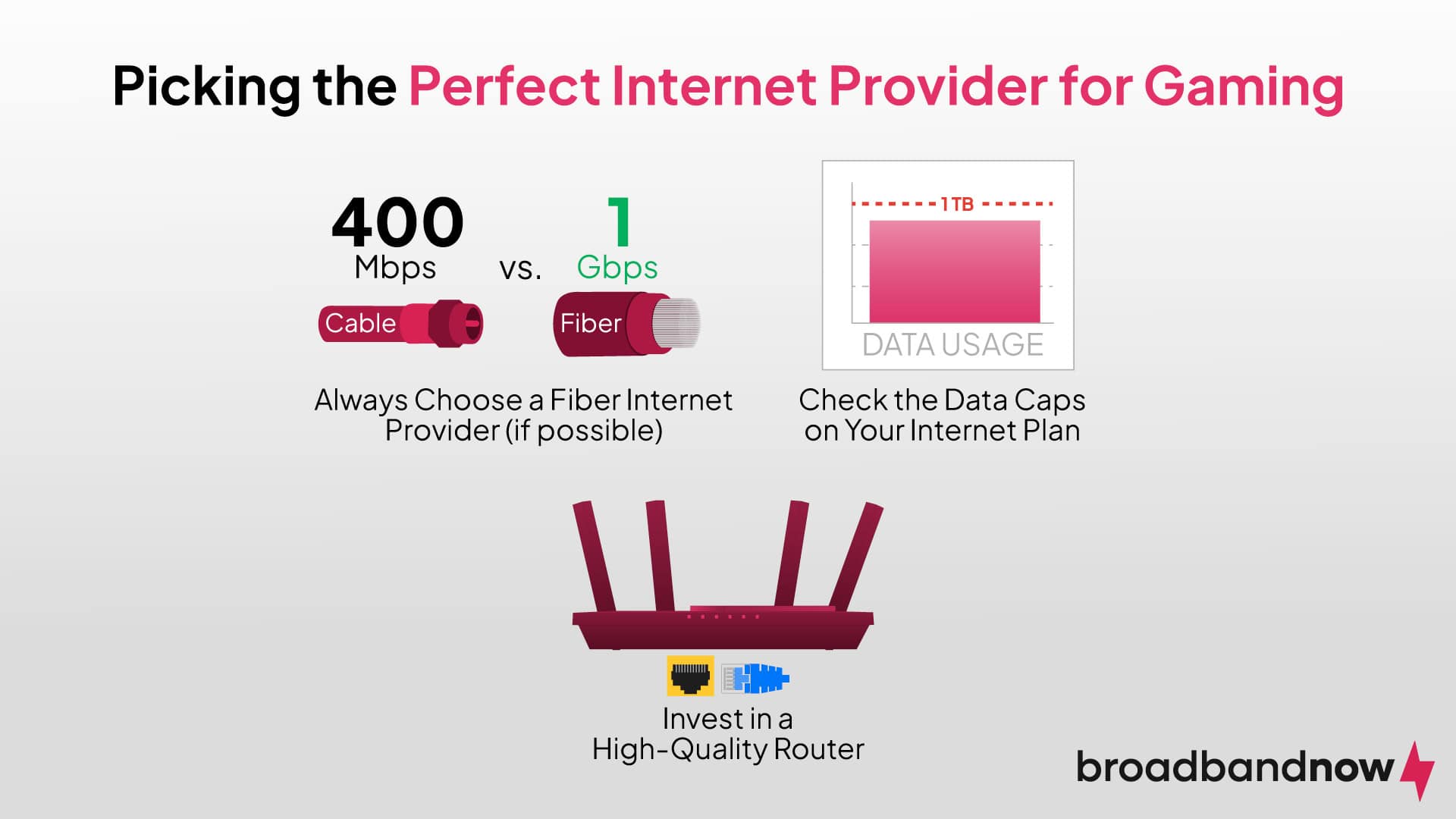
- Fiber connections almost always support VPN use better than cable or DSL due to lower latency and higher upload speeds.
- Providers with strict data caps can quickly become limiting for VPN users who stream or download frequently.
- Although download speeds are often advertised heavily, upload speed consistency is critical for VPN users who work remotely with cloud tools.
VPNs and Streaming Services: Why the Right ISP Matters
Streaming platforms sometimes block VPN servers, causing buffering issues. Having a stable, fast connection ensures that when a VPN server does work, the experience remains seamless. On forums like Reddit’s r/cordcutters, many users note that fiber-based ISPs provided smoother Netflix and YouTube streaming while connected to VPNs.
Tips for Getting More Out of Your Internet When Using a VPN
Even with the right provider, you can take steps to improve your VPN’s performance:
- Connect to a VPN server geographically closer to you for lower latency.
- Choose VPN protocols like WireGuard or IKEv2, which outperform older ones like PPTP.
- Use a wired connection instead of Wi-Fi whenever possible to reduce packet loss.
- Avoid peak hours when your ISP’s bandwidth may be saturated by other users.
You can even find practical guides on improving home networking on YouTube that walk through router configurations and VPN optimization tips.
Choosing the Best Internet Provider for VPNs
With all of this in mind, the “best” provider ultimately depends on your location and the services available to you. However, we can create a general checklist that holds true across regions:
- Prefer fiber-optic connections: Ideal for heavy VPN use.
- Avoid ISPs with strict throttling policies: Read customer reviews before signing up.
- Look for consistent rather than peak speeds: Consistency is more valuable than occasional high bandwidth.
- Seek providers without harsh data caps: Especially important for streaming through VPNs.
Final Thoughts
If VPN use is central to your daily routine—whether for work, privacy, or entertainment—choosing the best internet provider for seamless VPN performance is just as important as picking the right VPN service. By focusing on stability, speed, and transparency from your ISP, you’ll ensure that your VPN runs smoothly, securely, and without interruption. Remember: a VPN can only be as strong as the internet service it’s built on.
Best Internet Options for Smooth VPN Performance
When it comes to using a Virtual Private Network (VPN), choosing the right internet connection can make or break your experience. A fast, reliable network ensures that your VPN runs smoothly without frustrating drops, slow loading times, or buffering. Today, we’ll explore the best internet options for smooth VPN performance, how to set up your network, and what to watch out for when trying to maximize speed and privacy.
Why VPN Performance Depends on Internet Quality
VPNs work by encrypting your data and routing it through a secure server, which naturally adds some overhead. If your connection is already struggling, that extra encryption can slow things down dramatically. That’s why picking an internet option that pairs well with VPN usage is so important.
Here are the factors that influence how smooth your VPN will run:
- Bandwidth: Higher bandwidth reduces slowdowns when streaming, gaming, or video calling.
- Latency (Ping): Low latency is critical for real-time activities like gaming or remote work calls.
- Packet Loss: Dropped data creates stutters and lag in your VPN session.
- Consistency: Stable connections prevent frequent disconnects.
Best Internet Connections for VPN Use
Fiber Internet
Fiber-optic internet is widely regarded as the best choice for VPN users. It offers symmetrical upload and download speeds, ultra-low latency, and reliable performance even during peak hours. Fiber is the gold standard if you want to stream through a VPN in high definition or work remotely with heavy usage of video conferencing.
Cable Internet
Cable internet is a solid alternative in areas where fiber isn’t available. Speeds can be very fast, but they often fluctuate depending on neighborhood usage. For VPN users, a high-tier cable plan usually provides smooth browsing and streaming.
DSL Connections
DSL internet uses phone lines and tends to be slower than fiber or cable. However, if you have a strong DSL connection in your area, it can handle VPN activity for lighter tasks like browsing and email. It may not hold up for 4K streaming while on a VPN, though.
Fixed Wireless Internet
Wireless internet delivered via a tower antenna can be a suitable option in rural areas. Performance depends heavily on the quality of the signal and distance from the tower. Good fixed wireless can support VPNs, but higher latency is common.
Mobile Data (4G/5G)
Mobile hotspots and cellular internet can work with VPNs, especially with newer 5G networks that provide higher speeds and lower latency than older 4G. However, VPNs may quickly consume your data allowance, so be mindful of data caps.
Satellite Internet
Satellite connections have high latency, making them less than ideal for VPNs. While you can browse and use basic services, expect noticeable delays for video calls and gaming. Satellite should only be considered if no alternatives exist.
How to Optimize Your VPN Experience
Choose Nearby Servers
Most VPN services let you pick servers by country or region. The closer your VPN server is to your actual location, the lower your latency is likely to be. For example, connecting from Chicago to a server in New York will generally perform better than connecting to one in Europe.
Use Wired Connections When Possible
While Wi-Fi is convenient, Ethernet cables usually provide faster and more stable connections. If you’re working from home or streaming movies over a VPN, a wired setup is a worthwhile improvement.
Pick VPN Protocols Carefully
Modern VPN protocols like WireGuard or OpenVPN (UDP mode) often provide the best balance between speed and security. Different options perform differently on each network, so it may take a little testing to find the best match for your setup.
Keep Your Router Updated
Old routers can bottleneck your VPN performance. Updating your router’s firmware or upgrading to a more capable model can boost speeds. Some advanced routers even include built-in VPN support, which can help distribute the load.
Comparing Internet Options for VPNs
| Connection Type | VPN Performance | Best For |
|---|---|---|
| Fiber | Excellent | Heavy VPN use, streaming, remote work |
| Cable | Very Good | Everyday browsing, HD streaming |
| DSL | Good | Light browsing, email |
| Fixed Wireless | Fair | VPN use in rural areas |
| Mobile (5G) | Good to Very Good | On-the-go or as a backup |
| Satellite | Poor | Last resort, rural access only |
Common VPN Issues and How to Fix Them
Slow Speeds
Sometimes VPNs may slow down your connection more than expected. Possible fixes include:
- Switching VPN servers to a closer location.
- Changing the protocol to a faster option like WireGuard.
- Restarting your router to refresh your connection.
Frequent Disconnects
VPNs dropping repeatedly is often tied to unstable internet connections. Strengthening your Wi-Fi signal, using Ethernet, or upgrading your plan can reduce interruptions.
Blocked Services
Some streaming services or websites attempt to block VPN traffic. If this happens, try switching servers or checking communities on Reddit where users share updated VPN workarounds.
Tips for VPN-Friendly Home Setups
- Router Placement: Keep your router in a central location to maximize Wi-Fi coverage.
- Limit Devices: Too many devices on your network can eat up available bandwidth—limit background usage when connected to a VPN.
- Upgrade Hardware: Devices with limited processing power may struggle with strong encryption, so newer routers or laptops may perform better.
- Use Community Resources: Check Quora and Reddit communities for real-world VPN tips from experienced users.
Final Thoughts
The best internet option for smooth VPN performance will depend on where you live and how you use the internet. Fiber stands out as the top choice thanks to its speed and consistency, but cable and even 5G can also provide great experiences. By optimizing your network setup and choosing the right connection type, you’ll enjoy a more seamless, secure, and private VPN session every time you go online.
# Apartment Wi‑Fi Winners: The Ultimate Guide
Choosing a Wi‑Fi plan that delivers lightning‑fast speeds without breaking the bank can feel like a scavenger hunt. For apartment dwellers, the challenge is only magnified by shared walls, limited carrier options, and the need for a reliable connection that keeps streaming, gaming, and working from home on one hand while also staying within a budget on the other.
Below, we’ve sifted through the market to spotlight **Apartment Wi‑Fi Winners**—providers that combine speed, affordability, and excellent customer service. Whether you’re in a large city or a quieter suburb, these picks will help you stay connected for less.
—
## 1. Know What Your Apartment Needs
| Factor | Why It Matters | Typical Requirements |
|——–|—————-|———————-|
| **Number of Devices** | More devices mean more bandwidth. | 3–5 smart devices + 1–2 PCs |
| **Comfort Zone** | How far the router must travel. | 15–30 ft for a shared apartment |
| **Primary Use** | Watching 4K vs. light browsing. | Streaming (HD/4K) & remote work |
| **Budget** | Set a realistic monthly ceiling. | $30–$80 per month |
**Tip:** Roughly, a basic apartment needs 25 Mbps to 50 Mbps per person for smooth streaming. If you throw in video calls and online gaming, bump it closer to 100 Mbps.
—
## 2. Speed Matters, but Data Rules
– **Mbps (Megabits per second)** tells you how fast a connection can transfer data.
– **Data Caps** can turn a plan from a winner into a loser when you hit limits.
– **Latency** (ping) is crucial for gaming and 2‑way video chats; lower numbers mean fewer hiccups.
If you’re reading the *Federal Communications Commission’s broadband guide* (link to https://www.fcc.gov/consumer-guides/broadband), you’ll find a clear breakdown of what speeds equate to what experiences. Keep in mind that real‑world speeds often fall 10–20% short of advertised numbers.
—
## 3. The Trick of Bundling
Many providers pull a bundle of internet, TV, and phone services. These often have:
| Bundle | Estimated Savings | Note |
|——–|——————|——|
| Internet + Phone | 10–15% off each | Phone often redundant if you have mobile |
| Internet + Streaming | 5–10% off | Some streaming services are free with certain ISPs |
| Multi‑Device Login | Unlimited access for all residents | Useful for renters shared between tenants |
A modestly priced bundle can make “Apartment Wi‑Fi Winners” feel less like a stretch and more like a convenience.
—
## 4. Top Picks For Fast & Affordable Apartment Wi‑Fi
### 4.1. **Xfinity Streamline 50/50**
– **Speed:** 50 Mbps Download / 50 Mbps Upload
– **Price:** $45/month (after promotional period)
– **Data:** Unlimited, no caps
– **Extras:** Free 1‑year Verizon Fios Data usage plan
**Why It Wins:** Offers a solid price for families or roommates and has a reliable network across major cities. Plus, Xfinity frequently runs “Free Wi‑Fi” promotions in apartment complexes.
> If you’re living in the greater Detroit metro, see our *High-Speed Internet in Detroit, MI 48201* page for tailored promos.
### 4.2. **Spectrum Pure Cognitive 60/60**
– **Speed:** 60 Mbps Both Ways
– **Price:** $70/month (one‑year contract)
– **Special:** Unlimited data, no throttling
– **Coverage:** Urban indoor apartments
**Why It Wins:** For those who need a bit more download speed—think 4K streaming—Spectrum delivers without hidden fees.
### 4.3. **Cox Home Connect 75/75**
– **Speed:** 75 Mbps Download / 75 Mbps Upload
– **Price:** $54/month (after 12‑month contract)
– **Data:** Unlimited, but prioritization during peak hours
– **Extras:** 1‑year free home security camera
**Why It Wins:** Excellent for dual 4K setups or remote work with high‑quality video calls, and the security add‑on feels like a bonus.
### 4.4. **AT&T Fiber 100/100** (If available)
– **Speed:** 100 Mbps Both Ways
– **Price:** $75/month (one‑year package)
– **Data:** Unlimited, no caps
– **Reliability:** Fiber optics = higher physical reliability
**Why It Wins:** The gold‑standard for consistent speeds. Fiber availability is patchy, but for those lucky enough to live near tests, it can be the maximum “Apartment Wi‑Fi Winner”.
—
## 5. Local Champions: Where the Jersey Comes in
Many internet providers target the suburbs where rent can be cheaper, and landlords sometimes collaborate. Check out these neighborhood‑specific plays:
– **Hyde Park, MI:** *Affordable WiFi Service in Wyandotte, MI 48192*
– **North Dearborn, MI:** *High-Speed Internet in Dearborn, MI 48126*
– **Southfield, MI:** *High-Speed Internet in Southfield, MI 48265*
These intranational pages list carrier offers available **right in your building**, often paired with tenant‑friendly contract terms.
—
## 6. Budget‑Friendly Tactics
| Tactic | Description | Example |
|——–|————-|——–|
| **Compare Copiers** | Check the same provider in two neighboring buildings. | Xfinity in two 3‑story buildings might offer an even better rate than the street. |
| **Monthly Deactivation** | Turn off service during a winter break if you’re a student. | 2‑month pause = $90 saved. |
| **Local Deals** | Some city governments run broadband projects. | Detroit’s “Access for All” can reduce monthly costs. |
| **Negotiate** | After calling for a new contract, ask for “match” the caller’s plan. | Some friends have secured $20 off by emailing their better offers. |
These tricks foster value without compromising speed—perfect for the savvy renter.
—
## 7. Stats That Speak
– According to the FCC, about **41% of U.S. households** have downloaded at least 25 Mbps within the last year.
– The *Consumer Technology Association* reports that the average home internet speed in 2024 is **131 Mbps**.
– **University of Iowa** analytics: Apartment-dwellers on average use **2.6 Tb of data monthly**, out of which **36%** is streaming.
This means that any “Apartment Wi‑Fi Winner” should support more than 50 Mbps per person to avoid congestion.
—
## 8. Final Check‑list
– **Identify your use‑case**: streaming, gaming, work.
– **Confirm provider availability** in your building.
– **Set a realistic budget** – round numbers are easier.
– **Ask about data caps** – unlimited is key for long‑term value.
– **Inquire on promo periods** – many companies drop the price after 6–12 months.
With this framework, any resident can find the fastest and most affordable internet service that matches their living environment.
—
### Get Started Today!
Check your city’s dedicated services on MyNeighborhoodWiFi.com. Whether you’re on the downtown edge or a quiet suburban block, we’ve curated listings—like *Affordable WiFi Service in Wyandotte, MI 48192*—that will have you connected in no time.
—