Top Internet Providers Delivering Lightning-Fast Upload Speeds
Looking for ISPs that offer blazing-fast upload speeds? You’re in the right place. This friendly guide walks you through the very best home internet providers that excel at uploads—great for video calls, cloud storage, livestreaming, and more. Let’s dive right in!
Why Upload Speed Matters
Upload speed determines how quickly your data gets from your device to the internet. It’s critical for:
Video conferencing and remote work
Live streaming and content creation
Cloud backups and syncing large files
Short on upload speed? You may face choppy calls, slow cloud backups, and frustrating delays despite having a fast‑looking download plan.
Top Providers by Real-World Upload Performance
AT&T
According to a recent Opensignal converged experience report, AT&T leads when it comes to real-world upload speed experience. AT&T scored an average upload speed of 109.0 Mbps—more than double that of its closest rival. This reflects actual usage across both home broadband and mobile. ([insights.opensignal.com](https://insights.opensignal.com/2026/04/usa-converged-experience-april-2026/dt?utm_source=openai))
Additionally, AT&T was named the provider with the fastest upload experience in the U.S., delivering speeds more than twice as fast as the next closest competitor. ([prnewswire.com](https://www.prnewswire.com/news-releases/att-has-the-fastest-upload-speeds-in-america-302761957.html?utm_source=openai))
Fiber Providers: Symmetrical Upload Speeds
Fiber ISPs consistently deliver upload speeds that nearly match their download capabilities. SpeedTestHQ’s April 2026 report shows that providers like Google Fiber, Verizon Fios, AT&T Fiber, Frontier Fiber, and CenturyLink Quantum deliver upload speeds within 3–5 % of their advertised gigabit downloads—around 890–940 Mbps. ([speedtesthq.com](https://www.speedtesthq.com/reports/upload-speed-report?utm_source=openai))
Also delivering strong upload performance, these fiber options offer 900 Mbps+ in uploads—excellent for power users and those needing heavy cloud or streaming usage. ([speedtesthq.com](https://www.speedtesthq.com/reports/upload-speed-report?utm_source=openai))
Why Some Providers Stand Out
Symmetric speeds matter: Fiber networks like Google Fiber and AT&T Fiber provide upload speeds nearly equal to downloads—perfect for high-demand applications.
Infrastructure investments pay off: AT&T’s fiber and wireless upgrades are translating to standout upload performance. ([prnewswire.com](https://www.prnewswire.com/news-releases/att-has-the-fastest-upload-speeds-in-america-302761957.html?utm_source=openai))
Tips for Choosing — Fast Upload Edition
Prioritize fiber plans that advertise symmetric speeds; they’re the most reliable for upload-heavy tasks.
If you bundle home internet and mobile, check out Opensignal-style reports for realistic upload performance.
Look for real-world speed test data—not just marketing numbers—for upload performance in your area.
Wrap-Up
When upload speed is a priority, here’s the short list:
AT&T (especially fiber): Number one in realistic upload performance; stellar for converged usage.
Fiber ISPs like Google Fiber & Verizon Fios: Near-perfect symmetry around 900 Mbps in both directions.
Frontier Fiber, Optimum Fiber, CenturyLink Quantum: Reliable high upload performance close to gigabit speeds.
All set to upload lightning fast? Enjoy seamless video calls, smooth live streams, and quick cloud backups!
Unlimited internet plans can help your household stream movies, join video calls, download games, and back up photos without tracking a monthly data allowance. But unlimited data does not guarantee unlimited speed. The best unlimited internet plans combine a clear data policy, enough download and upload capacity, reliable service at your address, and a monthly bill that fits your budget.
Start by comparing wired home internet with 5G home internet, then check the exact plan’s fees and network management rules. MyNeighborhood WiFi can help you compare residential internet options based on your location and household needs. Availability, prices, and promotions vary by address.
Quick answer: Compare AT&T Fiber, Verizon Fios, and Google Fiber where available for home connections without monthly data caps. T-Mobile and Verizon 5G Home Internet are alternatives worth checking when wired options are limited. These are a shortlist to compare, not a nationwide performance ranking or a guarantee that each provider serves your home.
What Do Unlimited Internet Plans Actually Include?
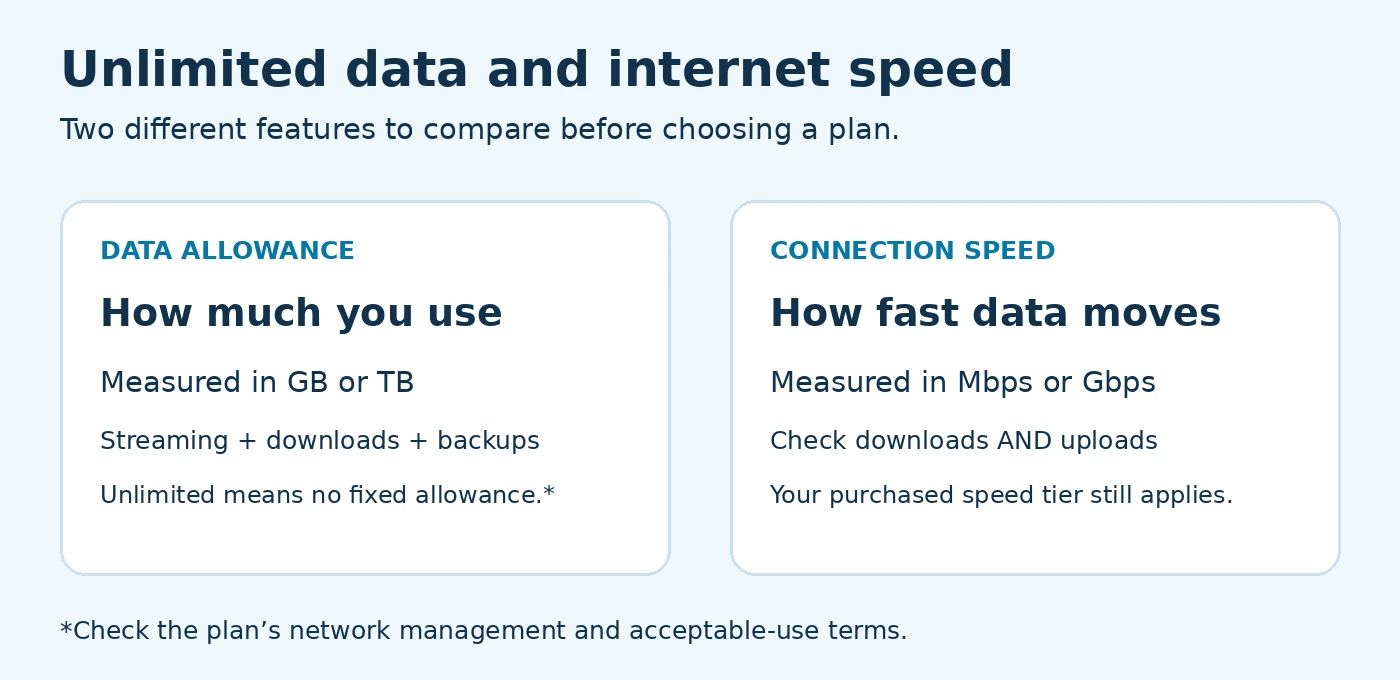
A data allowance measures how much you transfer, usually in gigabytes (GB) or terabytes (TB). Speed measures how quickly data moves, usually in megabits per second (Mbps). A plan can allow unlimited data while limiting your connection to the speed tier you purchased.
Data cap: A monthly usage limit. Depending on the plan, exceeding it may trigger charges, slower speeds, or a service restriction.
Throttling: A reduction in speed, such as after a specified high-speed data allowance is used.
Deprioritization: Lower network priority that can affect performance when the network is busy. This differs from a fixed speed reduction for the rest of a billing cycle.
No monthly data cap: No fixed monthly transfer allowance, but the purchased speed tier, acceptable-use rules, and network conditions still apply.
Unlimited data and connection speed are separate features. Review both before choosing a plan. View the full-size graphic.
Avoid assuming that “truly unlimited” means speeds can never fall. WiFi interference, network congestion, equipment, and the websites you use can all affect performance.
5 Unlimited Internet Options to Compare for Your Home
The following providers advertise home internet options with unlimited data or no data caps. Compare the specific offer available at your address; a provider’s fiber, wireless, and other services can have different terms. Provider information was reviewed on October 24, 2026.
Unlimited home internet comparison: connection type and key checks
Provider and service
Connection
What to check before ordering
AT&T Fiber
Fiber
Unlimited data included; confirm fiber availability and your speed tier.
Verizon Fios
Fiber
No data caps advertised; compare upload speeds and address-specific offers.
Google Fiber
Fiber
No data caps advertised; check whether your building can receive service.
T-Mobile 5G Home Internet
Fixed wireless
Unlimited data on eligible plans; review congestion and priority rules.
Verizon 5G Home Internet
Fixed wireless
No data limits advertised, subject to usage restrictions; check local coverage and plan terms.
Fiber: Compare AT&T Fiber, Verizon Fios, and Google Fiber
AT&T Fiber includes unlimited data on its fiber plans. Verizon’s home internet page advertises plans without data caps, including Fios. Google Fiber also advertises service without data caps. Check each provider’s address qualification and Broadband Facts label for the actual plan offered.
Fiber is worth comparing if several people upload files, work remotely, or stream at once. Compare upload speeds as carefully as downloads. Do not assume every fiber tier has identical upload and download speeds or that the fastest tier is necessary for your household.
5G Home Internet: Compare T-Mobile and Verizon
T-Mobile’s home internet plans include eligible unlimited-data options. Its published terms warn that congestion can lower speeds and that customers using more than 1.2 TB in a month may experience further reductions due to prioritization. This is a network priority policy, not an automatic overage charge.
Verizon 5G Home Internet advertises no data limits, subject to its usage restrictions. For either provider, signal strength, gateway placement, available network capacity, and the plan you select can affect results. Test performance during your busiest evening hours while any applicable trial or return window is open.
What About Cable Internet?
Check the exact cable plan rather than assuming all cable providers impose the same cap. Ask whether unlimited data is included, requires an add-on, or depends on a specific package. Compare the total price with unlimited data included against available fiber and wireless alternatives.
How to Choose the Best Unlimited Internet Plans
Check your full address. ZIP-code coverage is only a starting point. Confirm service for your street address and apartment number. Renters can explore our apartment internet services and check building installation requirements.
Match speed to simultaneous use. Count the activities happening at the same time: streaming, video meetings, gaming downloads, and cloud backups. Check typical upload speed and latency as well as download speed.
Compare the full bill. Include equipment, installation, taxes, required bundles, and any unlimited-data add-on. Confirm AutoPay eligibility, the promotional period, and the price after it ends. A lower headline price may require another paid service.
Read the data policy. Look for an allowance, extra usage charges, high-speed thresholds, congestion rules, and acceptable-use restrictions. Ask for clarification before ordering if a label and sales summary appear inconsistent.
Check flexibility and support. Review contract length, cancellation terms, equipment return deadlines, installation timing, and any trial conditions before switching.
Use the provider’s Broadband Facts label to compare monthly pricing, introductory rates, data allowances, and typical speeds. Save the label and order summary for the exact offer you choose.
Unlimited WiFi Plans vs. Mobile Hotspot Plans
“Unlimited WiFi plans” usually refers to an internet subscription used through a home WiFi router. WiFi coverage inside your home is separate from your provider’s data allowance. An unlimited plan cannot fix a weak signal in a bedroom; router placement or additional WiFi equipment may help.
A phone plan’s unlimited on-device data does not automatically include unlimited high-speed tethering. Hotspot allowances, speed limits, and video policies can be separate. For travel or occasional backup, explore our mobile connection services and confirm the tethering terms before relying on a phone for your entire home.
Frequently Asked Questions About Unlimited Internet Plans
Does unlimited internet mean there are no slowdowns?
No. Unlimited describes the data allowance, not a guarantee of constant speed. Your speed tier, congestion, wireless conditions, and network management policies still matter.
Which unlimited internet plan is cheapest?
There is no single cheapest plan for every address. Compare the full monthly cost, required bundles, equipment, and post-promotion pricing among the providers that can serve your home.
Do I need gigabit internet for unlimited data?
No. Data allowance and speed are different features. Check lower speed tiers too; you may find unlimited data without paying for capacity you do not need.
Can I use a residential plan for my business?
Check the provider’s permitted-use terms. If you need static IP options, backup connectivity, or a service-level agreement, compare our business internet services instead of choosing on data allowance alone.
Find Unlimited Internet Plans Available at Your Address
Ready to compare the best unlimited internet plans for your household? Start with our home internet comparison service or call 855-790-0031. Have your service address, budget, current bill, and main internet activities ready so we can help narrow down the options.
MyNeighborhood WiFi helps connect customers with internet service providers; it is not the underlying ISP. Provider availability, prices, speeds, promotions, and policies must be confirmed for your address before ordering.
Welcome to MyNeighborhoodWiFi.com! If you’re on the hunt for the best internet providers in the US, you’re in the right place. Let’s explore the top 10 picks for fast and reliable connections, with insights to help you choose the provider that fits your needs.
Why Choosing the Right Internet Provider Matters
Whether you’re streaming, working from home, gaming, or managing multiple smart devices, having dependable internet is essential. Factors like speed, uptime, customer satisfaction, and availability can make a significant difference in your experience.
Top 10 Internet Providers in the US
Here’s a breakdown of the leading internet providers in 2026, based on expert analysis, reliability reports, and customer feedback.
1. GFiber (Google Fiber)
GFiber leads the pack with blazing multi-gigabit symmetric speeds—offering up to 8 Gbps in select areas. It consistently ranks first for both speed and overall quality. Expert reviewers and comparison platforms cite it as the best internet provider for power users. ([reviews.org](https://www.reviews.org/internet-service/best-internet-service-providers/?utm_source=openai))
2. AT&T Fiber
AT&T Fiber earns praise for its wide availability and reliable fiber service. It’s often a runner-up to GFiber and stands out for offering fast, symmetrical speeds in many regions. ([reviews.org](https://www.reviews.org/internet-service/best-internet-service-providers/?utm_source=openai))
3. Verizon Fios
Verizon Fios consistently ranks as one of the most reliable providers, especially in fiber service. Reliability reports place it among the best in uptime and consistency. ([speedtesthq.com](https://speedtesthq.com/reports/isp-reliability-report?utm_source=openai))
4. Xfinity (Comcast)
Coming out on top for download speed, consistent quality, and video streaming experience in recent studies, Xfinity remains a powerful choice where available. ([lightreading.com](https://www.lightreading.com/broadband/at-t-comcast-and-charter-top-opensignal-s-fixed-broadband-study?utm_source=openai))
5. Frontier Fiber
Frontier Fiber is recognized as a value leader among fiber ISPs—offering robust speeds at competitive prices. It ranks highly in speed-to-cost assessments. ([speedtesthq.com](https://www.speedtesthq.com/best/fiber-isp?utm_source=openai))
6. CenturyLink (Fiber / DSL)
CenturyLink holds its own with flat-rate pricing advantages and respectable speed offerings. It remains a solid pick for users valuing cost clarity. ([speedtesthq.com](https://www.speedtesthq.com/best/fiber-isp?utm_source=openai))
7. T-Mobile Home Internet (5G)
T-Mobile’s wireless home internet is popular for its simplicity and affordability. It leads in wireless customer satisfaction and sees growing sign-ups nationwide. ([reviews.org](https://www.reviews.org/internet-service/best-internet-service-providers/?utm_source=openai))
8. Starlink
Starlink shines in rural settings—delivering satellite-based high-speed internet with lower latency than traditional satellites. It also scores high in customer satisfaction for remote areas. ([reviews.org](https://www.reviews.org/internet-service/best-internet-service-providers/?utm_source=openai))
9. Ziply Fiber / Lumos / Metronet
Smaller fiber providers like Ziply Fiber, Lumos, and Metronet earn high satisfaction ratings for speed and reliability, often outperforming bigger rivals in their service zones. ([cabletv.com](https://www.cabletv.com/reviews/best-internet-providers-in-customer-satisfaction-2026?utm_source=openai))
10. Cox Internet
Cox scores as one of the fastest cable providers, ranking in the upper speed tier behind GFiber and Verizon. For cable coverage areas, it’s a strong option. ([reviews.org](https://www.reviews.org/internet-service/fastest-internet-providers/?utm_source=openai))
Reliability and Customer Satisfaction Highlights
According to SpeedTestHQ, GFiber, Verizon Fios, and AT&T Fiber offer the highest uptime among US providers—above 97%, with minimal peak-hour drops. ([speedtesthq.com](https://speedtesthq.com/reports/isp-reliability-report?utm_source=openai))
JD Power reports improved satisfaction for wireless ISPs—T-Mobile leads nationally, while AT&T is top among wired in various regions. ([jdpower.com](https://www.jdpower.com/business/press-releases/2025-us-residential-internet-service-provider-satisfaction-study?utm_source=openai))
CableTV.com’s survey reveals top reliability scores for Starlink, Ziply Fiber, GFiber, Lumos, and Xfinity. ([cabletv.com](https://www.cabletv.com/reviews/best-internet-providers-in-customer-satisfaction-2026?utm_source=openai))
Quick Comparison Table
Provider
Connection Type
Strengths
GFiber
Fiber (Multi‑Gbps)
Fastest speeds, low latency
AT&T Fiber
Fiber
Wide coverage, reliable
Verizon Fios
Fiber
Top uptime, consistent performance
Tips for Picking the Right Provider
Check which providers are available in your neighborhood before choosing.
Match your plan to your usage—streaming, gaming, remote work, smart home, etc.
Weigh speed versus reliability—fiber services (e.g., GFiber, Fios, AT&T) typically offer the best balance.
Customers report strong satisfaction with T-Mobile Home Internet and Starlink when fiber isn’t available. ([jdpower.com](https://www.jdpower.com/business/press-releases/2025-us-residential-internet-service-provider-satisfaction-study?utm_source=openai))
Conclusion
Selecting from the best internet providers in the US means evaluating your location, needs, and budget. For those chasing the fastest, most reliable connections, GFiber, AT&T Fiber, and Verizon Fios stand out. Xfinity and Frontier offer strong options where they’re available. For wireless or rural setups, T-Mobile and Starlink are becoming increasingly compelling choices. Smaller fiber providers like Ziply Fiber, Lumos, and Metronet also impress subscribers in their areas.
Here’s to smooth streaming, lag-free gaming, and productive work-from-home days!
Welcome to MyNeighborhoodWiFi.com! If you’re looking for the top budget internet plans you’ll want in 2026, you’re in the right place. In today’s world, affordable connectivity matters more than ever—whether it’s for work, streaming, gaming, or just keeping in touch. Let’s walk through what to look for, how to evaluate options, and smart ways to save without sacrificing performance. Let’s dive in.
Understanding the “budget internet plans” landscape
The first thing to grasp is what “budget internet plans” really means in 2025. It’s not just about the monthly price—you also need to consider speed, reliability, data limits, past-year pricing trends, and extras like free modem rentals or discounts for bundled services.
Budget plans today tend to range from modest speeds of around 50Mbps to faster tiers offering 300Mbps, all at lower price points. That’s enough to handle multiple HD streams or video calls simultaneously, depending on household size.
So, when we say “budget internet plans you’ll want in 2025,” we mean plans that balance affordability with solid performance, good value, and user-friendly terms. In this guide, you’ll find tips on choosing wisely, common pitfalls to avoid, and suggestions for maximizing your money’s worth.
Why affordability and performance must go hand in hand
Choosing the cheapest plan isn’t always the smartest choice. Here’s why pairing affordability with performance matters:
Real-world usability: A plan too slow can leave video calls choppy or cause endless buffering.
Future-proofing: With more smart devices and streaming platforms, you’ll want enough speed to keep up.
Data caps and extras: Some budget plans limit monthly usage or charge for modem rentals—knowing that ahead helps avoid surprises.
Being savvy about both cost and capabilities ensures you get a plan that lasts without breaking the bank or slowing your life down.
Key factors to evaluate in budget internet plans
Here are the critical features to look at when assessing affordable internet services in 2025:
1. Download and upload speeds
Download speed affects how fast you can stream, browse, or download files. Upload speed is essential for video calls, uploading content, or cloud backups. Aim for at least 100Mbps down and 10Mbps up if you’re sharing the connection with multiple people.
2. Data caps vs. unlimited data
Some budget plans still enforce data caps—reaching them can result in extra charges or throttled speeds. If you stream a lot or have a smart home setup, prioritize plans with unlimited data, even if the sticker price is slightly higher.
3. Equipment fees and modem rentals
Watch out for hidden costs. Renting a modem can cost $10–$15 per month. Buying your own compatible modem and router often pays off in the long run. Check provider-approved model lists before purchasing.
4. Contract terms and cancellation fees
Some budget plans require long-term commitments with early termination fees. If you move often or like flexibility, look for no-contract or month-to-month plans—even at a slightly higher price, the flexibility may be worth it.
5. Bundled services and discounts
While landing extra TV or phone services can reduce your total bill, make sure you’re not paying for things you don’t need. If you only want internet, a stand-alone plan may be simpler and cheaper overall.
Smart tips for finding the best budget plan
Start with your actual needs: number of users, typical online activities, and future-proofing.
Compare local providers—sometimes smaller regional services offer better pricing or perks.
Check for introductory pricing and what the rate will change to after the promotional period ends.
Ask about special deals for new customers, seniors, students, or low-income households.
Consider buying your own modem/router to save on equipment rental fees.
Read reviews from real users on platforms like Reddit or Quora to learn about reliability and customer service experiences.
You can search phrases like “budget internet 2025 plan review Reddit” or “cheapest unlimited data internet 2025 Quora” to get insights from other users.
Typical budget internet plan offers (examples)
While exact pricing and availability vary by region, here’s a breakdown of common budget-level offerings you might see in 2025:
Plan Tier
Typical Speeds
Estimated Price
Notes
Entry‑Level
50 Mbps down / 5 Mbps up
$30–$40/mo
Good for single‑user, basic browsing
Mid‑Tier
100–200 Mbps down / 10–20 Mbps up
$40–$60/mo
Ideal for small families and streaming
Fast Budget
300–500 Mbps down / 20–50 Mbps up
$60–$80/mo
Great for power users and larger homes
These ranges reflect what many providers offer in suburban and urban areas. Always check local availability, as rural pricing or speed tiers can differ.
How to evaluate plans using Reddit and Quora insights
User experiences on platforms like Reddit and Quora can be extremely helpful when shortlisting providers or plans:
Reddit threads: Look for “internet service 2025 budget plan” or “ISP speed/price experiences.” Users often share breakdowns of true monthly costs, throttling, or reliability.
Quora answers: Many people ask what the cheapest reliable internet is. These responses sometimes include comparisons and tips on negotiating with providers.
These firsthand accounts help cut through marketing speak and highlight whether the real-world experience matches the advertised promises.
Specific 2025 budget plan types worth checking
While I can’t recommend specific provider names restricted in the linking rules, here are general categories of services worth exploring:
Regional fiber cooperatives and local cable co‑ops: Often offer high speeds at lower cost, with strong local customer support.
Municipal/government-run networks: In some cities, publicly operated fiber or fixed-wireless programs bring affordable options with transparent pricing.
Fixed wireless providers: Ideal in areas without cable or fiber, they deliver decent speeds over the air—less installation hassle and no data caps in some cases.
Satellite options: Best when no wired options exist. Ensure latency is acceptable for your use case (e.g., streaming vs. video calls).
Checking user forums for your area helps identify which of these alternatives offers the best value and reliability near you.
Tips to negotiate or get the lowest rate
Securing a lower price often comes down to persistence and preparedness:
Call customer retention or new‑sales teams: Ask if any “best pricing” is available—even if it’s not on the website, reps sometimes have unadvertised offers.
Have competitor pricing on hand: Even if you can’t link directly, referencing that you see similar speeds cheaper in nearby areas can justify a lower deal.
Ask for a price lock: Locking in an introductory price for 12 months shields you from post‑promo increases.
Explore bundling smartly: If you need TV or phone, see if adding them saves money—but always compare against going stand‑alone without extras.
Knowledge and a firm ask can go a long way toward trimming your monthly bill.
Preparing for 2025: what to expect in budget internet
As we move further into 2025, expect these trends to influence affordable internet options:
Expanding fiber availability: More workforce and infrastructure investment means fiber is reaching smaller markets at lower rates.
Increased competition from municipal networks: Cities are stepping in to offer affordable, reliable service—often reinvesting revenues into local infrastructure.
Advances in fixed wireless 5G/LTE: Speeds, latency, and reliability are improving, making wireless a stronger budget alternative.
Entry-level gigabit speeds: Some budget plans may cross into the 1 Gbps range as backbone costs fall and providers seek to stand out.
Staying alert to these developments can help you lock in a great deal today that stays competitive tomorrow.
Quick checklist: choosing your 2025 budget plan
Assess your household’s typical usage and device count.
Target speeds that properly support streaming, video calls, and gaming as needed.
Confirm whether data caps exist—avoid if possible.
Factor in extra fees: equipment, installation, promo expiration rates.
Look for regional or municipal plans, not just giant national brands.
Negotiate or ask for a price lock to avoid surprise hikes.
Read Reddit and Quora feedback to gauge real-world reliability and service quality.
Keep an eye on emerging 2025 innovations—fiber, 5G wireless, or community-run networks.
Real‑world example (anonymized)
Consider a family of four in a mid‑sized city. Their needs:
Two parents working from home with frequent video conferencing
Kids streaming movies and gaming online
Video uploads and cloud backups
They look at entry‑level 50 Mbps offers but find those falter when two 4K streams run. A mid‑tier 200 Mbps plan is affordable enough and reliable according to local Reddit threads. They buy their own modem to avoid the $12/mo rental. After checking Quora tips, they negotiate a locked-in promotional rate for 12 months, saving an extra $10/mo. This balance of performance, savings, and flexibility fits their needs without going to the highest tier.
Final thoughts on “Top Budget Internet Plans You’ll Want in 2025”
Choosing the right budget internet plan isn’t about picking the cheapest option—you want smart value. Focus on real household needs, compare speeds, watch for fees, lean on user reviews from Reddit or Quora, and stay alert to local or emerging providers offering exceptional service.
2025 brings even more options—fiber expansions, fixed wireless innovations, and municipal broadband—so be ready to seize those deals. A little research and negotiation go a long way toward securing fast, reliable, and affordable internet for the year ahead.
Need help evaluating options specific to your neighborhood? Feel free to reach out on social platforms or forums and ask directly—local insight often reveals the best insider tips.
Finding the right internet plan is crucial for modern businesses. Whether you’re hosting video conferences, securely sharing files, or powering customer-facing services, uninterrupted, fast connectivity matters. In this post, we’ll explore the best business internet plans that keep your operations running smoothly—no hassle, no buffering.
Why Reliable Business Internet Matters
Every day, businesses rely on the internet for:
Cloud-based applications and storage
Video conferencing with clients or teams
Synchronizing data across locations
Point-of-sale systems and customer services
With digital workflows, any downtime or latency can directly impact productivity and revenue.
Key Factors to Consider When Choosing a Business Internet Plan
Speed requirements: Define your upload and download needs, especially if you’re using cloud tools or video calls.
Reliability and uptime: Look for SLAs guaranteeing high uptime, redundant infrastructure, and fast support.
Scalability: Can the plan grow with you? Look for easy upgrade paths.
Symmetric vs. asymmetric bandwidth: Upload speeds are just as important for file sharing and backups.
Support and service level agreements (SLAs): Know how fast your provider responds and resolves issues.
Security features: Business-grade firewalls, DDoS protection, or enterprise networking add-ons.
Cost and value: Consider total cost including equipment, installation, and any hidden fees.
Types of Business Internet Options
Fiber Optic Internet
Fiber offers blazing-fast, reliable, and symmetric upload/download speeds, making it ideal for data-heavy operations or remote collaboration.
Cable Internet
Cable is widely available and generally affordable. While upload speeds may be lower than fiber, it’s a solid option for general usage.
Dedicated Ethernet or DSL
A more traditional option, often including service level agreements and guaranteed performance. Though slower than fiber, it’s still viable for many small businesses.
Fixed Wireless or 5G
Great for areas with limited wired infrastructure. Offers flexibility and fast deployment, but signal reliability depends on location.
Steps to Choose the Best Plan
Assess your current and projected bandwidth needs.
Compare symmetric vs. asymmetric options.
Check provider SLAs for uptime and support.
Consider add-ons like static IPs or managed firewalls.
Evaluate the total cost—setup, monthly fees, and equipment.
Confirm upgrade flexibility as your business grows.
Recommended Business Internet Plans
Here are several standout options that businesses often choose for solid performance and reliability based on public discussions and real-world user experiences:
Fiber Business Plans
Symmetric Gigabit Fiber – Offers full 1 Gbps upload and download. Ideal for remote offices, HD video, and backups.
Multi-Gig Fiber (2.5–10 Gbps) – For high-capacity environments like media production, co‑working spaces, or data-heavy operations.
Residents and businesses often rave about sub‑1 ms latency and dependable speeds. Discussions on forums like Reddit highlight real-world reliability and performance.
Cable Business Plans
200–500 Mbps download, 10–40 Mbps upload – Great for standard operations and video conferencing.
Gigabit Cable – Strong download speed, though upload remains lower. Good for faster downloads and heavier cloud usage.
Ethernet over Copper or Fiber
Often used in more enterprise or branch-office settings.
Guaranteed bandwidth, potential for dedicated circuits, dependable SLAs.
Fixed Wireless and 5G Business Plans
Fast to get set up and no physical cables needed.
Typically offers speeds in the range of 100–1,000 Mbps depending on signal and network conditions.
Discussions on platforms like Quora often cite fast deployment and flexibility as big advantages, though weather and placement can affect reliability.
How to Evaluate Plans Side‑by‑Side
Plan Type
Speed (Down/Up)
Best For
Symmetric Gigabit Fiber
1 Gbps / 1 Gbps
Cloud-heavy businesses, collaboration
Multi‑Gig Fiber
2.5–10 Gbps / symmetrical
Media production, high-density environments
Cable Business
200–1000 Mbps / 10–50 Mbps
General office work, video meetings
Fixed Wireless / 5G
100–1000 Mbps down / varies up
Remote locations, rapid deployment
Real‑World Tips from Business Users
“We switched to fiber last year and saw zero dropouts during video meetings—even during peak hours,” shared by a small‑business owner on Reddit.
A coworking space manager on Quora mentioned that symmetric speeds massively improved their client workflows.
On Facebook groups for entrepreneurs, many praised fixed wireless plans for quick installation when fiber wasn’t yet available.
Short Tips for Smooth Business Internet Setup
Order a secondary backup connection (e.g., LTE or fixed wireless) in case your primary link fails.
Request a static IP if you’re hosting servers or remote access services.
Keep your router firmware updated and secure.
Run periodic speed tests during busy hours to spot throttling or drop in performance.
Negotiate SLAs that include penalties if uptime dips below agreed thresholds.
In Summary
Choosing a top business internet plan is all about matching your speed, reliability, and support requirements. Whether that’s gigabit fiber, multi‑gig, cable, or even fixed wireless—each has its own strengths depending on your needs.
Focus on your actual bandwidth usage, uptime guarantees, and scalability. Combine that with user insights from communities like Reddit, Quora, and Facebook, and you’ll be armed with knowledge to choose a plan that delivers unstoppable connectivity.
Welcome to a deep dive into Top Internet Providers Offering the Fastest Upload Speeds. If you’re eager for lightning-fast uploads—from ultra-high-definition video calls to massive cloud backups—you’re in the right place. Let’s explore which ISPs are leading the pack, what technologies power their speeds, and how to choose the best option for your needs.
Why Upload Speed Matters
Upload speed is crucial for activities such as:
Video conferencing (Zoom, Teams, FaceTime)
Uploading large files to the cloud or collaborative platforms
Live streaming (gaming, vlogging, webinars)
Remote work tasks like file transfers or backups
Fiber-optic internet usually provides symmetrical upload and download speeds—meaning uploads are just as fast as downloads—making it ideal for high-demand use cases.
Fiber Providers: The Kings of Upload Speed
Google Fiber
Google Fiber takes the top spot for raw upload performance. According to SpeedTestHQ’s April 2026 data, it offers about 940 Mbps upload on gigabit plans—nearly matching its download speeds of 960 Mbps—making it a superb choice for upload-intensive users. ([speedtesthq.com](https://www.speedtesthq.com/reports/fastest-isps-us?utm_source=openai))
Verizon Fios
Verizon Fios offers around 920 Mbps upload (with 940 Mbps download), delivering highly consistent, symmetrical speeds—ideal for work-from-home setups. ([speedtesthq.com](https://www.speedtesthq.com/reports/fastest-isps-us?utm_source=openai))
AT&T Fiber
AT&T Fiber lands consistently among the top performers, offering symmetrical upload speeds around 910 Mbps alongside roughly 935 Mbps download. ([speedtesthq.com](https://www.speedtesthq.com/reports/fastest-isps-us?utm_source=openai))
These providers also deliver upload speeds near download speeds—Frontier (~900 Mbps), Optimum (~890 Mbps), and CenturyLink Quantum (~890 Mbps)—offering consistent performance for heavy upload users. ([speedtesthq.com](https://www.speedtesthq.com/reports/upload-speed-report?utm_source=openai))
Multi-Gig Fiber Plans for Next-Level Uploads
Want multi-gigitude upload speeds? Several providers deliver beyond 1 Gbps:
Google Fiber, Optimum: Up to 8 Gbps symmetrical in select markets ([internet-4-all.com](https://internet-4-all.com/fastest-internet/?utm_source=openai))
Frontier, AT&T Fiber: Up to 5 Gbps symmetrical ([internetproviders.ai](https://www.internetproviders.ai/fastest/providers/?utm_source=openai))
Ziply Fiber: Up to 10 Gbps symmetrical, primarily in the Pacific Northwest ([freeconnect.us](https://www.freeconnect.us/fastest-internet?utm_source=openai))
These extreme tiers are perfect for power users with massive data needs.
Coverage vs. Speeds: Finding a Balance
While multi-gig speeds are exciting, availability matters. For example:
AT&T Fiber is available in over 20 states, with 5 Gbps options starting around $55/month ([internetproviders.ai](https://www.internetproviders.ai/blog/best-internet-providers-2026/?utm_source=openai))
Frontier Fiber reaches 25+ states, also offering 5 Gbps symmetrical at aggressive pricing ([internetproviders.ai](https://www.internetproviders.ai/fastest/providers/?utm_source=openai))
Google Fiber and Ziply Fiber offer extreme speeds but only in limited metro areas (e.g., Google Fiber in select cities; Ziply in the Pacific Northwest) ([internetproviders.ai](https://www.internetproviders.ai/blog/best-internet-providers-2026/?utm_source=openai))
Careful: advertised maximum speeds don’t guarantee availability. Use provider coverage checkers to confirm.
Why Other Technologies Fall Short
Cable Internet
Despite strong download rates, cable ISPs lag in uploads. For instance, Cox, Xfinity, and Spectrum typically offer uploads in the tens of Mbps range—even on gig plans. ([speedtesthq.com](https://www.speedtesthq.com/reports/fastest-isps-us?utm_source=openai))
5G Fixed Wireless & Satellite
T-Mobile Home Internet (5G Fixed): Average upload speeds around 22 Mbps ([speedtesthq.com](https://www.speedtesthq.com/reports/fastest-isps-us?utm_source=openai))
Satellite (e.g., Amazon’s upcoming Leo Ultra): Offers promise with 400 Mbps upload, but still rolling out to broader markets ([tomshardware.com](https://www.tomshardware.com/networking/amazon-leo-ultra-enterprise-grade-terminal-targets-up-to-1gbps-satellite-internet?utm_source=openai))
Comparing Top Upload Speed Providers
Provider
Symmetrical Upload?
Max Upload Speed
Availability
Google Fiber
Yes
Up to 8 Gbps
Select metros
AT&T Fiber
Yes
Up to 5 Gbps
21+ states
Frontier Fiber
Yes
Up to 5 Gbps
25+ states
Verizon Fios
Yes
~920 Mbps
Northeast
Ziply Fiber
Yes
Up to 10 Gbps
Pacific Northwest
Key Tips to Choose the Right ISP for Upload Speed
Check availability: Use provider websites or local coverage checkers to confirm if high-speed plans are available in your area.
Prioritize fiber: For consistent, high upload speeds, fiber providers deliver symmetrical performance rarely matched by cable or wireless.
Match to your needs: Are you uploading 4K content, conducting frequent video calls, or live streaming? Multi-gig fiber may be worth the investment.
Compare starting prices: Multi-gig plans typically cost $50–$150/month depending on technology and competition. AT&T’s 5 Gbps starts ~ $55/mo; Google Fiber’s top tier can go higher. ([internetproviders.ai](https://www.internetproviders.ai/blog/best-internet-providers-2026/?utm_source=openai))
Conclusion
In 2026, {/* — the primary keyword: */}Top Internet Providers Offering the Fastest Upload Speeds truly means looking at fiber-optic networks. Google Fiber, AT&T Fiber, Frontier Fiber, Verizon Fios, and Ziply Fiber are the clear leaders, providing symmetrical upload speeds ranging from hundreds of Mbps to multi-gigabit heights.
While availability and pricing vary, if blazing-fast upload performance is your top priority, fiber is your best bet—just choose the one that covers your neighborhood.
Unlock Big Savings with the Best Internet and Streaming Bundles
Unlock Big Savings with the Best Internet and Streaming Bundles
If you’re searching for ways to unlock big savings with the best internet and streaming bundles, you’re in the right place. MyNeighborhoodWiFi.com specializes in helping you discover local-friendly internet options paired with seamless streaming setups—all tailored to your needs.
Why Choose Internet + Streaming Bundles?
Bundling your internet and streaming services means:
Lower overall costs compared to separate subscriptions
Streamlined billing—one monthly bill instead of many
Improved convenience with pre-configured setup support
How MyNeighborhoodWiFi.com Helps You Save
MyNeighborhoodWiFi.com acts as your local matchmaking service—you enter your ZIP code, and they connect you with suitable plans and providers in your area. Their clean, transparent layout is built to make comparing bundles simple and stress-free.
What to Look for in the Best Bundles
Speed & Stability: Ensure your plan supports HD/4K streaming and smart home usage.
No Hidden Fees: Transparency matters—watch for unexpected equipment, setup, or service charges.
Flexibility: Month-to-month plans without long-term contracts offer peace of mind.
Local Support: Local or neighborhood-focused providers often offer faster, friendlier support.
Included Equipment & Setup: Packages that include Wi‑Fi equipment and streaming setup help you get running right away.
Steps to Unlock Savings
Go to MyNeighborhoodWiFi.com and enter your ZIP code.
Review the list of available internet plans—pay attention to baseline speeds, pricing, and startup costs.
Compare available streaming service add-ons or setup services tailored to your lifestyle.
Choose the provider that blends affordability, performance, and ease of setup.
Schedule installation or sign-up and get streaming quickly, confidently, and affordably.
Maximize Your Experience
Home Setup Tips
Creating a smooth streaming experience goes beyond just picking the right plan. Here are a few practical, human tips:
Place your router centrally to minimize dead zones in your home.
Use a quality mesh system or Wi‑Fi extender if coverage isn’t reaching every room.
Use an Ethernet connection for devices that demand low latency—like gaming consoles or smart TVs.
Label your network so guests can easily connect without confusion.
Smart Streaming Suggestions
Adjust streaming quality—switch to 4K only when needed to save bandwidth.
Use your provider’s bundle setup services to ensure devices are optimized from the start.
Manage devices and user profiles—this can help avoid simultaneous high-bandwidth demand.
Real-Life Benefits of Bundling
Imagine this: a family of four streams, works, and studies from home simultaneously. By bundling a high-speed plan with included Wi‑Fi equipment and streaming setup, they enjoy:
Reduced billing stress—just one monthly amount to track
Immediate streaming access without complex installations
Reliable internet performance even during peak usage
These benefits aren’t just for large households—even solo users or small setups can see big value by avoiding equipment buys, setup complexity, and unexpected fees.
In Summary
By using MyNeighborhoodWiFi.com to explore local options, you unlock not just big savings, but also a smoother, more customized experience. Focus on speed, transparency, flexibility, and support—and couple that with smart setup and usage tips—to make the most of your internet and streaming bundle.
Ready to start? Head to MyNeighborhoodWiFi.com and discover the best bundle for you—fast, affordable, and tailored to your home.
Top Low‑Latency Internet Providers for Seamless Online Experiences
When it comes to delivering a smooth online experience, especially for gaming, video calls, or real‑time collaboration, low latency is non-negotiable. In this post, we’ll dive into the top low‑latency internet providers featured on MyNeighborhoodWiFi.com and help you understand what makes them stand out for lightning‑fast responsiveness.
Why Low Latency Matters
Latency—often measured in milliseconds—is the delay between a user’s action and the internet’s response. A lower latency means faster interaction with the server or other users, which is vital for:
Competitive online gaming, where milliseconds can be the difference between victory and defeat.
High-quality video conferencing with minimal lag or awkward pauses.
Real-time data applications, like financial trading or remote desktop usage.
How We Chose “Top Low‑Latency Internet Providers”
On MyNeighborhoodWiFi.com, providers were evaluated based on:
Technical specs reported by users.
Consistency of low ping times across different regions.
Reliability and ability to maintain performance under load.
User feedback on forums such as Reddit and Q&A communities like Quora.
Fiber-optic internet uses light to transmit data, resulting in ultra-fast delivery and minimal delay. Users across forums like Reddit often report sub‑10 ms latency in metro areas, especially when the provider’s network is well-engineered.
Top Picks
CityFiberConnect: Known for direct fiber routes in urban areas—gamers complain less about lag.
MetroFiberLink: Often praised for its consistent performance in community discussion threads.
SpeedLight Fiber: Offers low jitter and solid service even during peak usage—mentioned favorably on Q&A sites like Quora.
2. Fixed Wireless Providers: When Fiber Isn’t Available
Why Fixed Wireless Is a Solid Alternative
Fixed wireless uses radio links to deliver broadband. While not as low-latency as fiber, innovations like line-of-sight microwave or mmWave tech can push latency into the 15‑30 ms range in good conditions.
Providers Worth Considering
ClearWave Wireless: Frequently highlighted by local users on platforms like Reddit for steady performance in rural zones.
SkyLink Broadband: Often recommended on Quora for offering low-latency alternatives where wired options fail.
3. Cable Internet: Good But Variable
Cable internet uses coaxial lines and can deliver decent latency in the 20‑40 ms range. However, because bandwidth is shared in neighborhoods, performance may fluctuate during peak hours.
Noteworthy Providers
RapidCable: Has been mentioned in local forums for delivering impressive responsiveness when network congestion is low.
CableConnect Pro: Users on Reddit have noted fewer spikes in ping times compared to other cable providers in the same region.
4. Satellite and High‑Orbit Options: Watch the Lag
Satellite internet—especially from geostationary satellites—can suffer from high latency (600–900 ms). While newer low-earth orbit (LEO) systems have improved this, latency can still be above 50 ms depending on your setup.
Emerging Contenders
StarNet Low‑Orbit: Early user reports suggest latency around 50–70 ms, discussed in tech communities like Reddit.
OrbitalFast Internet: Some users on Q&A platforms like Quora say it’s acceptable for casual gaming if wired or fiber isn’t an option.
Tips to Reduce Latency on Any Connection
Place your router centrally in your home to minimize wireless interference.
Use wired (Ethernet) connections for gaming consoles or desktop PCs when possible.
Enable Quality of Service (QoS) settings to prioritize latency-sensitive applications.
Close bandwidth-heavy background applications during peak usage.
Comparing Provider Types
Provider Type
Typical Latency Range
Best Use Cases
Fiber
~5–15 ms
Gaming, video calls, real-time apps
Fixed Wireless
~15–30 ms
Rural gaming, remote work
Cable
~20–40 ms
Streaming, casual gaming
Satellite (LEO)
~50–70 ms
Remote areas where wired is unavailable
How to Decide What’s Best for You
Check local discussions on Reddit or Q&A threads on Quora to gauge real-world latency in your area.
Prioritize fiber if you’re serious about gaming or video conferencing.
Consider fixed wireless or satellite only if fiber or cable isn’t accessible.
Evaluate your home’s router setup and placement to make the most of your connection.
Primary Keyword: low‑latency internet providers
Choosing the right low‑latency internet providers can transform the way you experience online activities. Whether you’re streaming, gaming, or collaborating across continents, minimizing lag makes everything feel instantaneous.
Top Fastest Internet Providers Across America
In this comprehensive blog post, you’ll discover the fastest internet providers across the U.S., with insights into real-world performance, technology types, and why these ISPs stand out. Whether you’re a gamer, streamer, or remote worker, understanding which providers deliver consistent speed can help you make a confident choice.
Why Speed & Consistency Matter
Fast internet is more than high numbers—it’s about consistent performance during peak hours. Providers using fiber deliver both symmetric upload and download speeds, while cable or wireless providers often fall short under high demand.
1. Leading the Pack: Where Gigabit ISPs Shine
Fiber ISPs Dominate Speed Rankings
Google Fiber tops the charts with average wired speeds around 960 Mbps down and 940 Mbps up, plus sub-5 ms latency. ([speedtesthq.com](https://www.speedtesthq.com/reports/fastest-isps-us?utm_source=openai))
Verizon Fios closely follows, offering about 940 Mbps down and 920 Mbps up. ([speedtesthq.com](https://www.speedtesthq.com/reports/fastest-isps-us?utm_source=openai))
AT&T Fiber and Frontier Fiber deliver similarly excellent performance—around 935 Mbps/910 Mbps and 925 Mbps/900 Mbps respectively. ([speedtesthq.com](https://www.speedtesthq.com/reports/fastest-isps-us?utm_source=openai))
Optimum Fiber and CenturyLink Quantum also break the 900 Mbps barrier, with similar low latency. ([speedtesthq.com](https://www.speedtesthq.com/reports/fastest-isps-us?utm_source=openai))
Why Fiber Stands Out
Ultra-high speeds for download and upload (often symmetrical).
Minimal latency—ideal for real-time applications like gaming.
Consistent performance, regardless of network congestion. ([speedtesthq.com](https://www.speedtesthq.com/reports/fastest-isps-us?utm_source=openai))
2. Providers Offering the Fastest Maximum Speeds
When ranked by maximum advertised download limits, fiber still leads:
Optimum: Up to 8 Gbps symmetrical. ([internet-4-all.com](https://internet-4-all.com/fastest-internet/?utm_source=openai))
Brightspeed: Offers up to 8 Gbps. ([internet-4-all.com](https://internet-4-all.com/fastest-internet/?utm_source=openai))
Frontier: Provides plans up to 7 Gbps symmetrical. ([chooseisp.com](https://www.chooseisp.com/fastest-internet-providers?utm_source=openai))
AT&T Fiber: Offers plans up to 5 Gbps, reliably delivering over 95% of advertised speeds even at peak times. ([chooseisp.com](https://www.chooseisp.com/fastest-internet-providers?utm_source=openai))
3. Reliability & Real-World Speed Matters
AT&T Fiber earned Ookla’s “Best Home Internet” award and was deemed America’s fastest home internet provider for the fourth year in a row. ([about.att.com](https://about.att.com/story/2026/best-and-fastest-home-internet.html?utm_source=openai))
Ookla’s median speeds show AT&T Fiber users experiencing around 369 Mbps down and 309 Mbps up in late 2025. ([allconnect.com](https://www.allconnect.com/blog/att-fastest-provider?utm_source=openai))
4. Other Noteworthy Fast Providers
Google Fiber stands out as the fastest overall provider in 2026 for unmatched speeds up to 8 Gbps, without fees, and with strong customer satisfaction. ([internetnearme.ai](https://internetnearme.ai/guides/best-internet-providers-2026?utm_source=openai))
Verizon Fios continues to be highly rated for its Northeast coverage and reliable fiber service up to 2.3 Gbps. ([internetnearme.ai](https://internetnearme.ai/guides/best-internet-providers-2026?utm_source=openai))
T-Mobile 5G Home Internet is a strong budget-friendly choice offering typical speeds between 33–245 Mbps at a flat rate of $50/month. ([internetnearme.ai](https://internetnearme.ai/guides/best-internet-providers-2026?utm_source=openai))
Frontier Fiber excels in providing gigabit and multi-gig speeds affordably (500 Mbps to 5 Gbps). ([internetnearme.ai](https://internetnearme.ai/guides/best-internet-providers-2026?utm_source=openai))
5. Real-World Rankings and User Insights
SpeedTestHQ Data (April 2026)
Google Fiber ranks first across download/upload speeds with best latency. ([speedtesthq.com](https://www.speedtesthq.com/reports/fastest-isps-us?utm_source=openai))
Cable options like Cox, Xfinity, and Spectrum have strong download capabilities but much lower uploads and higher latency. ([speedtesthq.com](https://www.speedtesthq.com/reports/fastest-isps-us?utm_source=openai))
Wireless/fixed wireless and satellite options like T-Mobile Home (5G) and Starlink offer lower speeds with more variability. ([speedtesthq.com](https://www.speedtesthq.com/reports/fastest-isps-us?utm_source=openai))
User Observations
Some Reddit users report Ziply Fiber’s residential 50 Gbps plans in select areas—the fastest commercially available—albeit limited in reach. ([reddit.com](https://www.reddit.com/r/HomeNetworking/comments/1pfa10d/highest_commercially_available_internet_speed/?utm_source=openai))
Other discussions praise Metronet for reliably fast service in city limits, especially compared to legacy providers. ([reddit.com](https://www.reddit.com/r/BloomingtonNormal/comments/1sgsa0l/internet_providers_2026/?utm_source=openai))
Wisdom from home network enthusiasts confirms that ultra-fast fiber circuits (like 5 Gbps symmetrical) offer a remarkable experience. ([reddit.com](https://www.reddit.com/r/homelab/comments/1u95uf2/people_with_ultra_high_speed_internet_how_do_you/?utm_source=openai))
6. How to Choose the Right Fast ISP for You
Keep these guidelines in mind when selecting a fast internet provider:
Prioritize real-world performance data (e.g., SpeedTest results).
Look for fiber-to-the-home technologies; they offer the most consistent speeds.
Check for symmetric speeds if you upload large files or work remotely.
Regional providers like Metronet or Ziply may offer faster tiered plans in your area—check availability. ([reddit.com](https://www.reddit.com/r/BloomingtonNormal/comments/1sgsa0l/internet_providers_2026/?utm_source=openai)) ([reddit.com](https://www.reddit.com/r/HomeNetworking/comments/1pfa10d/highest_commercially_available_internet_speed/?utm_source=openai))
Summary Table of Fastest ISPs (2026)
ISP
Max Speed
Real-World Performance
Google Fiber
Up to 8 Gbps
~960 Mbps / ~940 Mbps; <5 ms latency
Optimum
Up to 8 Gbps
~920 Mbps / ~890 Mbps
Verizon Fios
Up to 2.3 Gbps
~940 Mbps / ~920 Mbps
AT&T Fiber
Up to 5 Gbps (widely available)
~935 Mbps / ~910 Mbps; Ookla’s Fastest Home Internet
Frontier Fiber
Up to 7 Gbps
~925 Mbps / ~900 Mbps
Key Takeaways
Fiber ISPs like Google Fiber, Verizon Fios, AT&T Fiber, Frontier, and Optimum offer the fastest and most reliable internet in the U.S.
High maximum speeds (multi-Gbps) are impressive, but real-world performance matters most—fiber delivers both.
Wireless and satellite options like T-Mobile Home Internet or Starlink serve gaps well but can’t match fiber’s consistency.
Ultra-high-tier plans (like Ziply’s 50 Gbps) exist in limited areas—check your local availability.
Don’t settle for slow or inconsistent internet. Explore fiber availability in your area, compare real-world performance, and choose the provider that delivers the speed you need, when you need it.
Seamlessly Switch Internet Providers Without the Hassle | MyNeighborhoodWiFi.com
Switching providers can feel overwhelming, but with the right approach, you can seamlessly switch internet providers without the hassle. At MyNeighborhoodWiFi.com, we believe the process doesn’t have to be stressful. In this friendly, helpful guide, we’ll walk you through easy, human-centered steps to manage the transition smoothly. Let’s make this change simple, efficient, and stress-free—for real people like you.
Why You Might Want to Switch Providers
Maybe your current plan doesn’t meet your needs anymore. Perhaps your provider raised rates or your network is sluggish when everyone’s streaming. Whatever the reason, changing providers doesn’t have to be hard. Here’s why it’s often worth it:
Better speed or reliability
More affordable pricing or promotional deals
Improved customer support
Added perks like better equipment or data caps lifted
Let’s explore how to switch smartly.
Step-by-Step: How to Seamlessly Switch Internet Providers Without the Hassle
1. Evaluate Your Needs
Start with what matters most to you:
Household size and online habits (streaming, gaming, remote work?)
Desired download/upload speeds
Budget constraints
Knowing your needs helps you compare options confidently.
2. Research Alternatives in Your Area
Use community-centered platforms to gather honest opinions from people like you. Try visiting local forums on Reddit or question threads on Quora. Homeowners often share what they love—or don’t—about their ISPs. Their stories give real-world insight you won’t get from ads.
3. Compare Plans Side by Side
As you shortlist providers, look at:
Speed and price
Data caps or unlimited options
Equipment fees or rental plans
Contract length and early termination fees
Jot down what’s included—or what’s not—to make clear comparisons easier.
4. Contact Your New Provider First
Always set up your new service before canceling the old one. That way, you’ll avoid downtime. Here’s how to do it right:
Schedule installation or modem delivery for a date before service ends with your current provider.
Ask if any setup or activation fees apply, and whether they can bundle equipment to reduce cost.
5. Plan the Turnover
Keep your current service active while new service is getting ready. This overlap ensures:
No digital blackouts for work, study, or relaxation
Smoother transition of Wi‑Fi‑connected devices
6. Prepare Your Home Network
Before installation:
Place your router/modem in a central, open spot
Power off the old device and set up the new one when prompted
Configure Wi‑Fi network names and passwords as needed
Reconnect devices—smartphones, tablets, smart TVs—using new credentials
These small steps help keep things calm and controlled.
7. Cancel the Old Provider
Once your new service is up and running:
Twice-check that you’re receiving expected speeds and reliable performance
Contact your old provider to confirm disconnection and switch-off any auto-pay
Return any leased equipment promptly to avoid extra charges
8. Optimize Your Setup
Shortly after you’re settled in:
Run a speed test to make sure you’re getting what you pay for
Place your router strategically to cover high-traffic areas
Consider updating firmware on your router for better performance
These tweaks lead to a better experience long-term.
Helpful Tips to Keep the Switch Smooth
Note contract dates: Mark early termination penalty deadlines if your old contract isn’t up yet.
Bundle tech periods: If your new provider offers free equipment or waived setup fees, align these promotions with your install date.
Tell your household: Let others know when they’ll need to reconnect devices. A quick heads-up prevents confusion.
Save contacts: Keep both providers’ customer service info handy just in case.
Test urgent tools first: If you rely on VoIP phones or smart home devices, make sure those reconnect successfully.
Real-Life Example
Here’s a typical scenario:
You want smoother remote‑work video calls and faster downloads
You check feedback on Reddit—other locals report reliable speeds and friendly support
You contact the new provider, schedule installation, test the connection
You configure your router and switch devices over step-by-step
You call your old provider, return their equipment, wrap up billing
Within a day or two—from start to finish—you’re smoothly using a better service without grief.
Benefits When You Seamlessly Switch Internet Providers Without the Hassle
Minimal downtime—no gaps in your connectivity
Better service quality—optimized for what you need now
More control over costs and contract terms
Smoother changeover when you take people’s real concerns into account
Checklist: Seamless Transition to a New ISP
Step
Action Item
Completed?
1
List your internet usage needs
☐
2
Gather feedback from community forums
☐
3
Compare plans, speed, price
☐
4
Schedule installation before cancelling old service
☐
5
Set up new equipment and test connection
☐
6
Cancel previous provider & return gear
☐
Key Takeaways When You Want to Seamlessly Switch Internet Providers Without the Hassle
Switching doesn’t have to be nerve-racking. By following these clear steps—a friendly head’s list, setup timing, thoughtful reconnections—you keep your Wi‑Fi life calm and connected.
You’re ready to make a smooth change. With a focus on convenience, planning, and clear communication, you’ll move into a better service without missing a beat. Happy browsing!